

Your data never touches us
We can't see your data. We don't have anywhere to keep it. Sync goes through your own Drive, or nowhere.
Updated 21 October 2026 · Version 0.2.5
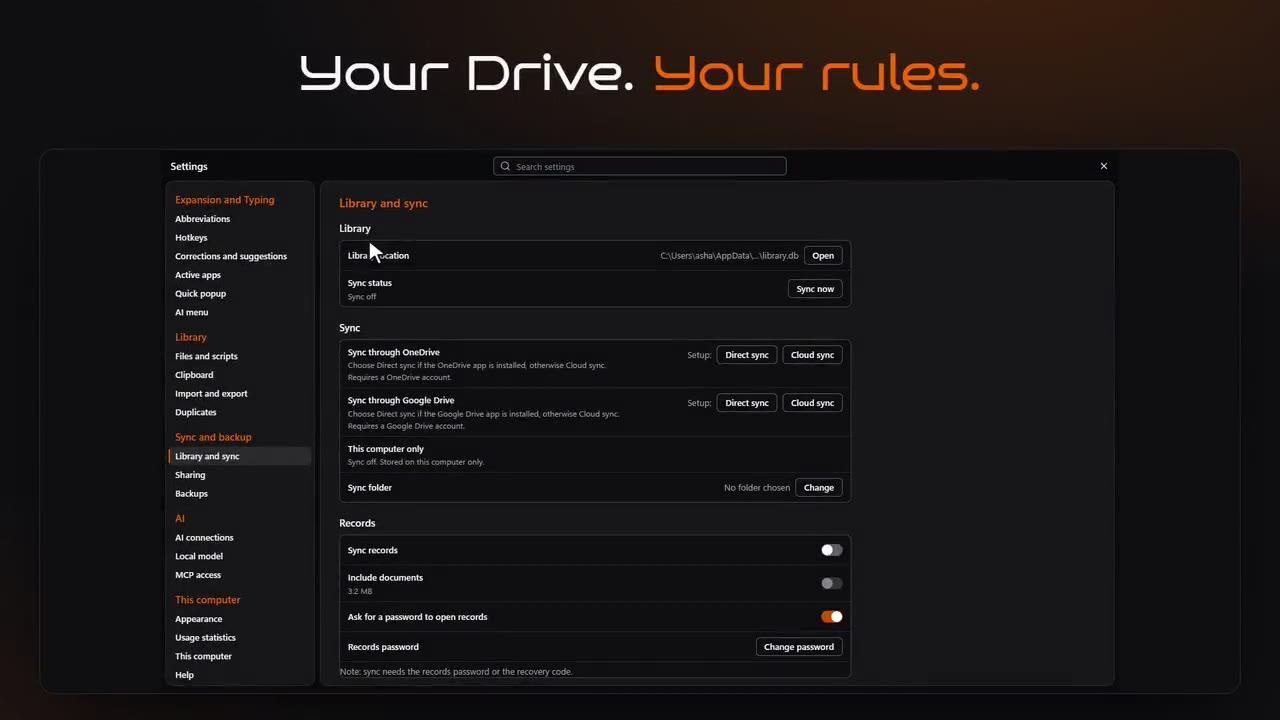
No servers. No copies.
- No Promptuoso account Nothing to sign up for inside the app.
- No Promptuoso cloud Your library is a folder on your PC.
- No middleman Your PC talks to your Drive, and that's all.
Three ways to sync, all yours
- Direct sync Pick a folder in your own OneDrive or Google Drive. Their app carries it between your PCs.
- Cloud sync Sign in once to your own Drive. Google sees only the files Promptuoso made; OneDrive only its own app folder.
- This PC only Sync nothing at all.
Encrypted vault sync
Your keys sync as one encrypted file. Even your Drive can't read them.
Wipe your PC. Lose nothing.
Versioned backups of the library, the knowledge graphs and the AI setup, restored in one step.
Typing stays private
Keystrokes are matched in memory and never written down. Password managers and apps you exclude are never read. Clipboard history never leaves the PC.
Your AI only sees what you allow
MCP access is off until you switch it on, folder by folder.
How others do it
Most snippet and prompt tools sync through their own servers, so someone else holds a copy of your prompts, notes and client details. Promptuoso has no server to hold anything.
Questions
What does Google see with Cloud sync?
Only the files Promptuoso creates. The permission is Google's narrowest one for Drive.
Do I need sync at all?
No. Everything works on one PC with sync off.
Leaving?
One tick in the uninstaller removes everything Promptuoso put on your PC.
Hire your AI team. It starts on launch day.
Pay once. 2 desktops and 2 phones, every update, the phone app included.